
1. Download Catchall Agent (here)
2. Create dir and copy file to “C:\Program Files\Microsoft\Exchange Server\V14\TransportRoles\agents\catchall”
3. Edit config.xml
<config>
  <domain name="mydomain.com" address="catch-all@mydomain.com" />
</config>
4. run powershell script
install-transportagent -Name "CatchAll Agent" -TransportAgentFactory:CatchAll.CatchAllFactory -AssemblyPath:"C:\Program Files\Microsoft\Exchange Server\V14\TransportRoles\agents\catchall\CatchAllAgent.dll"
5. run powershell
get-TransportAgent
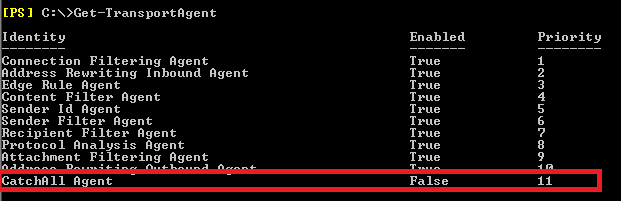
6. Change priority so that it is over “Recipient Filter Agent” (I use Priority 3)
set-transportagent "CatchAll Agent" -Priority:3
7. Enable transportagent
enable-transportagent “CatchAll Agent”
8. Create the mailbox catch-all@ address.
Now it should work from outside, you can test it with sending a email to nonexistenemail@mydomain.com
, it should then apper in catch-all mailbox
Work from inside your orginasition:
Get-AcceptedDomain | fl domainname, *type*
Set-AcceptedDomain ntd-offshore.com -DomainType InternalRelay
New-SendConnector -Name “Internal Relay” -Custom -AddressSpaces mydomain.com -SmartHosts mysmarthost.com -SourceTransportServers sbs.domain.local
Sourcelist:
http://chrismullen.co.uk/setup-a-catchall-transport-agent-on-exchange-20072010-servers/
http://catchallagent.codeplex.com/discussions/62204
http://exchangeserverpro.com/how-to-share-an-email-domain-between-two-mail-systems/